Choose count up or count down
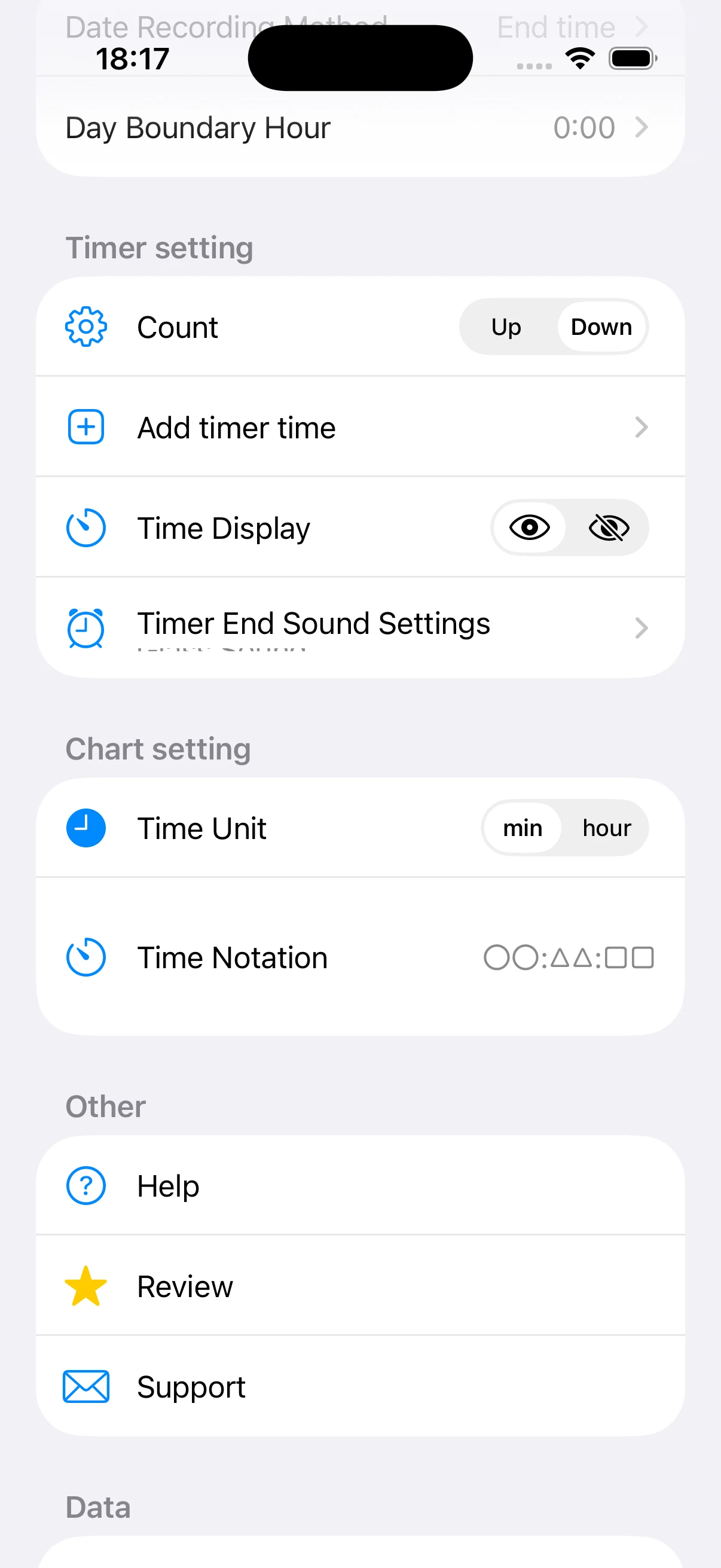
Count Down reduces the remaining time from your chosen duration, while Count Up shows elapsed time. Use a countdown for a fixed block and count up when the amount completed matters more than a planned end.
Add the timer durations you use
The app includes standard preset times and lets you add your own. Add values such as 25 or 45 minutes when they match your routine, and remove unused choices so starting a session stays quick.
Adjust the visible time and end sound
You can hide the time label if checking the remaining time breaks your concentration. Choose a timer-end sound as well, while respecting device volume and quiet-space rules.
Define how late-night sessions are dated
A session that crosses midnight can be recorded by its start or end time. You can also define the daily boundary from midnight through 8:00, which helps group after-midnight study with the previous study day.
Choose chart units and notation
Charts can use minutes or hours, and time can appear in colon or h/m/s formats. Minutes work well for short sessions, while hours can be easier to scan in longer summaries.